
Direct answer
How should an image-to-video prompt be structured?
A strong image-to-video prompt protects the uploaded frame before it asks for movement. State what must remain fixed, select one camera move, assign one dominant subject action, describe only necessary secondary motion, and prohibit the failure modes that matter. Short, specific direction can reduce opportunities for the model to redesign identity, products, vehicles, text, or scene geometry.
Model behavior changes across tools and versions. The method below is a control framework derived from AI Craft Academy spec production, not a universal prompt guarantee.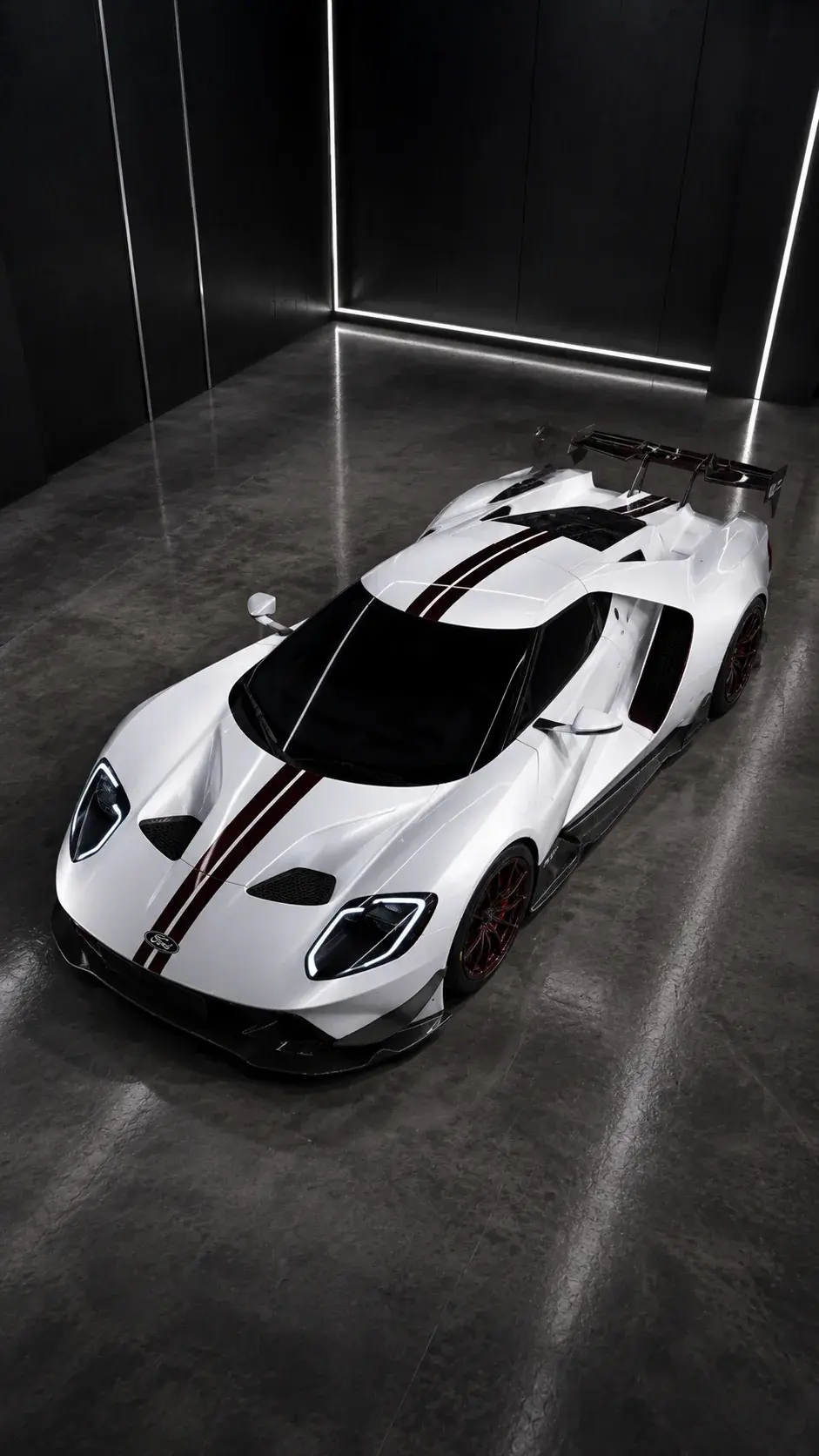
First-hand motion proof
Controlled motion started from approved automotive stills.
Each Ford GT angle had a defined visual role before animation. Motion was assigned after vehicle geometry, studio light, camera angle, and branding were accepted in the source frame.
Inspect the complete case studyUnofficial AI-generated automotive spec concept; no Ford affiliation or endorsement.Motion prompts are not image prompts
The image already defines appearance. Re-describing every visual detail can invite the video model to reinterpret the frame. Focus on continuity, camera behavior, subject action, environmental motion, and prohibited changes.
A compact motion prompt structure
A useful prompt can be short when each instruction has a clear job.
- Frame lock: preserve the uploaded image as the exact first frame.
- Subject lock: keep identity, product, body, vehicle, or wardrobe stable.
- Camera: dolly, slider, orbit, crane, handheld, or locked tripod.
- Action: one readable movement with realistic speed and weight.
- Secondary motion: light, fabric, hair, reflections, smoke, or water.
- Prohibitions: no morphing, duplicate objects, new text, or camera shake.
Split motion into four production rows
Before writing the final instruction, separate camera, subject, environment, and edit. The camera row defines path, speed, height, distance, and endpoint. The subject row contains one readable performance or product action. The environment row contains only necessary secondary movement. The edit row records duration, usable entry and exit, transition, and sound cue.
If the camera and subject both demand attention, simplify one or divide the moment into separate shots. This Motion Split makes the brief portable across tools and makes a failed generation easier to diagnose than a paragraph where every movement competes at once.
Treat a motion reference as a second source of truth
A motion-reference workflow combines an appearance source with a movement source. Confirm that the motion clip is owned, commissioned, licensed, or otherwise permitted. Then compare framing, body visibility, clothing, environment, and camera behavior with the approved character frame before generation.
A movement source with a moving camera or hidden limbs may force the model to invent information that the still does not contain. Scene modes and controls can change between product versions, so review the complete clip rather than treating a selected mode as a consistency guarantee.
Edit around model limits
Not every shot needs complex action. Controlled detail shots, slow pushes, and short inserts often create a more expensive sequence than forcing one generation to perform an entire scene.
Write the motion instruction in layers
Begin with continuity: preserve the exact subject, product, vehicle, wardrobe, environment, composition, and text already approved in the frame. Add one camera instruction with direction and speed. Add one dominant subject action. Then describe limited secondary movement such as hair, fabric, reflections, smoke, water, or light.
End with a short prohibition block based on the actual risk: no morphing, duplicate objects, new text, redesigned product details, unstable hands, background replacement, or unrequested camera shake.
Plan duration around motion complexity
Longer generations create more time for identity and geometry to drift. Use the shortest duration that completes the shot’s editorial job. A detail insert may need only a subtle push; a reveal needs enough time for the camera move to read but not enough to invent a second scene.
When a shot needs several actions, split it into separate approved source frames and edit the results. Do not force a single generation to perform a complete sequence.
Build continuity between separate shots
Record screen direction, camera height, lens feel, light direction, subject orientation, prop position, and the intended cut. The end of one shot and the first frame of the next do not need to be identical, but they must agree on the visual facts the viewer uses to understand space and identity.
Judge temporal stability, physical weight, edge consistency, reflections, hands, labels, and background motion—not only whether the camera moved.
Sources and methodology
Official context, independently organized.
The source review used official Higgsfield product education to identify current motion-control concepts. The prompt framework, test rows, and QA decisions are AI Craft Academy's original synthesis. This is independent educational guidance, not an endorsement, affiliation, or independently verified model comparison.
- First and Last Frame TutorialOfficial Higgsfield YouTube video · Published 2026-03-01 · Relevant sections 02:30, 05:43, 06:44 · Reviewed 2026-07-19
Public metadata and chapter labels were reviewed for image-to-video setup and shot evaluation; transcript coverage was unavailable.
- WAN Camera ControlOfficial Academy tutorial · Published 2026-06-29 · Reviewed 2026-07-19
Reviewed for public guidance on reference preparation, camera selection, and draft-to-quality iteration.
- Kling Motion ControlOfficial product page · Publication date not listed · Reviewed 2026-07-19
The public page was available but exposed limited explanatory copy, so coverage is incomplete and no behavior claim is derived from it.
Diagnostic table
Find the failed layer before regenerating.
| Visible signal | Likely cause | Controlled correction |
|---|---|---|
| The subject redesigns immediately | The prompt redescribes appearance instead of locking the frame | Remove image-generation language and lead with continuity |
| Motion begins well then morphs | Duration or action complexity exceeds the stable window | Shorten the shot or split the action |
| The camera and subject fight each other | Several dominant motions are requested | Keep one camera move and one subject action |
| Adjacent shots do not cut together | Screen direction, light, or subject orientation changed | Add shot-to-shot continuity notes before generation |
Production checklist
Approve the system, not only the best frame.
- The uploaded image is already approved for identity, geometry, hands, text, and composition.
- The prompt begins with continuity rather than appearance description.
- One camera move has a clear direction and speed.
- One dominant subject action can finish within the planned duration.
- Secondary motion supports rather than competes with the shot.
- The review checks temporal stability, physics, edges, reflections, and edit continuity.
Frequently asked
Questions this workflow should answer.
How do you prevent identity drift in image-to-video generation?
Start from a strong approved still, state identity and scene continuity first, request limited motion, keep the shot short enough for the action, and avoid redescribing the subject in ways that invite reinterpretation.
Should an image-to-video prompt repeat the full image prompt?
Usually no. The image already defines appearance. Focus on what must remain fixed, camera behavior, subject action, secondary motion, timing, and prohibited changes.
Why do longer AI video clips morph more?
Every additional moment gives the model more frames in which geometry, identity, text, and background details can diverge. Split complex sequences into shorter controlled shots when stability matters.

Written from production practice
Omer Faruk Sahin
Founder, CEO, and Creative Director at AI Craft Academy. Omer leads strategy, product, advertising, creative direction, and the production systems documented in these field guides.
Founder profileContinue building
Learn the complete production workflow.
The Academy connects prompt structure to references, first frames, motion, editing, distribution, and monetization.
Explore the Academy