
Direct answer
Direct the camera as one physical move
Choose the storytelling job first, translate it into one movement family, and define the opening frame, path, speed, and ending frame. Keep subject performance on a separate instruction row. This makes a failed result diagnosable: you can tell whether the camera ignored its path, the subject action broke, or both instructions competed.
Camera-control names and presets vary by model and release. The direction system below stays intentionally physical and tool-neutral so a production can move between interfaces without rebuilding its shot logic.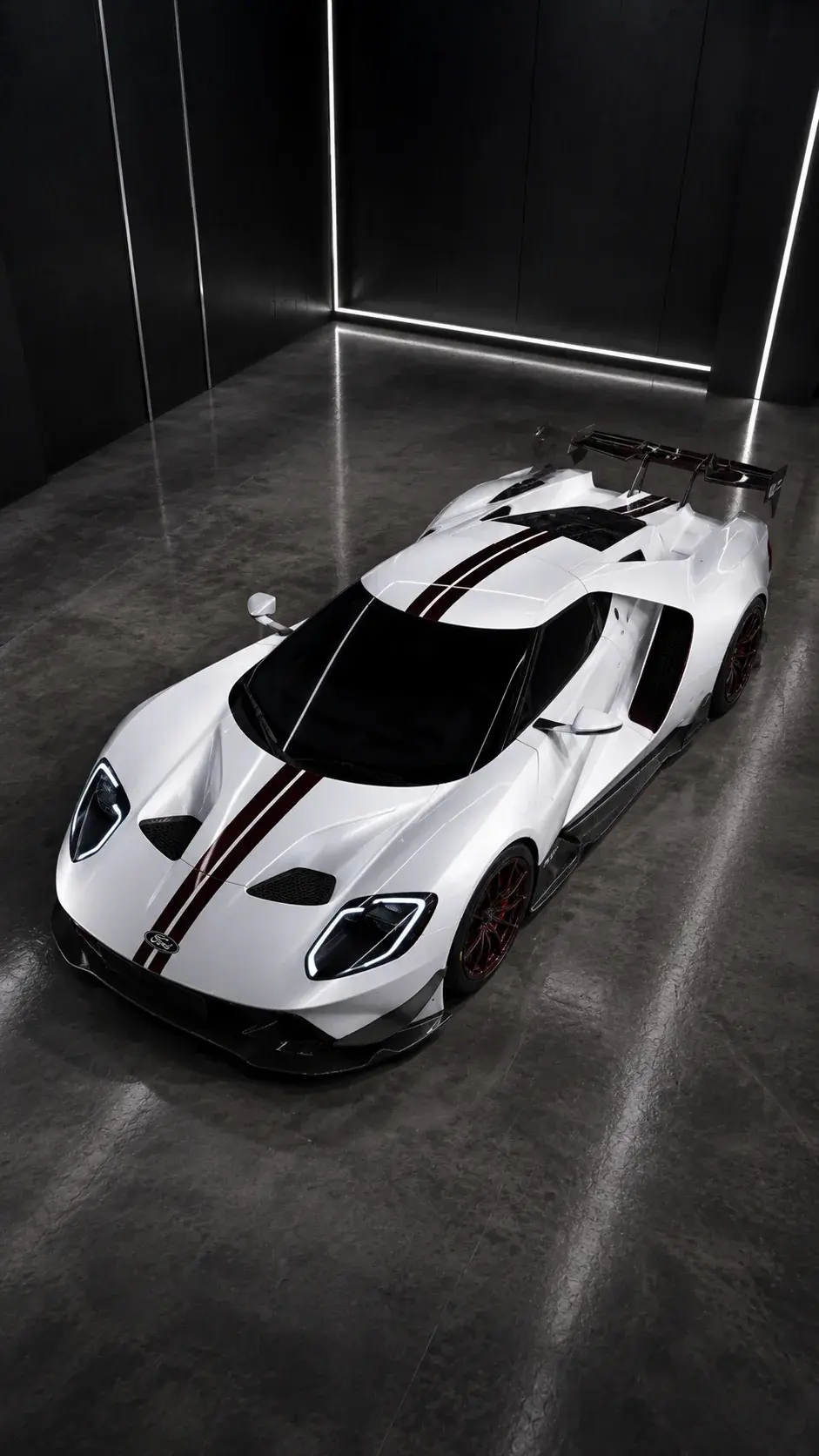
First-hand movement proof
The automotive study treated each camera move as a separate shot job.
The master vehicle frame established geometry and surface treatment before high-angle, profile, detail, and motion variants were directed. Each shot was judged on camera path and vehicle stability rather than cinematic language alone.
Inspect the complete case studyUnofficial AI-generated automotive spec concept. AI Craft Academy is not affiliated with or endorsed by Ford Motor Company.Name the storytelling job first
A camera move should reveal information, intensify scale, follow action, or create a transition. Choosing orbit or drone only because it sounds cinematic often produces movement without meaning. State what the viewer should discover by the end of the shot.
Describe a complete move
Useful direction contains a starting composition, path, speed, and ending composition. Keep the subject action separate so the model does not confuse camera movement with object movement.
- Slow dolly in: increase attention without changing angle.
- Lateral slider: reveal depth between foreground and subject.
- Controlled orbit: show form while preserving distance and horizon.
- Crane rise: move from detail to environment or scale.
- Locked tripod: let performance or product motion carry the shot.
Avoid stacked camera commands
A single clip rarely needs a push, orbit, tilt, zoom, and rack focus at once. Each added instruction creates another chance for geometry or identity to drift. Build complex sequences from several simple, editable shots.
Choose a movement family before a preset
Start with the physical relationship the shot needs: approach, retreat, lateral reveal, rotation, elevation, or a locked viewpoint. Then choose a tool control or preset that expresses that family. This keeps the direction portable when a model renames controls or exposes different camera options.
A useful test brief records the opening frame, movement family, approximate speed, subject action, and required final composition. Change only one of those variables between attempts so the result explains what the control actually did.
- Approach or retreat: change perceived intimacy or scale.
- Lateral reveal: create parallax and uncover information.
- Orbit: inspect form while controlling horizon and distance.
- Rise or descend: move between detail and environmental context.
- Locked viewpoint: prioritize performance, product motion, or continuity.
Separate camera compliance from subject performance
A clip can follow the requested camera path while failing the subject action, or preserve the subject while improvising the camera. Review those outcomes as separate rows. Approve the path only when its direction, speed, stability, and ending frame are usable; approve performance only when identity, anatomy, contact, and timing hold.
When both rows fail, reduce the brief before switching tools. A restrained subject action with one camera instruction produces more diagnostic evidence than another complex prompt with several changes.
Write a five-part movement brief
Record the opening composition, movement family, speed, subject action, and required final composition. If a tool offers a named control, map it to this brief rather than letting the preset name replace the direction.
The ending frame matters because the shot must cut somewhere. A move that looks impressive but ends with a hidden product, broken eyeline, or unusable crop has not completed its production job.
Review two rows before aesthetic polish
The camera row checks path, direction, speed, stability, horizon, and endpoint. The performance row checks identity, geometry, anatomy, contact, timing, and product fidelity. Pass or fail them separately before evaluating texture, grade, or spectacle.
If the path passes but performance fails, simplify action while preserving camera direction. If performance passes but the path fails, lock the subject and test the camera alone. If both fail, shorten the clip and reduce the brief to one movement.
Sources and methodology
Official context, independently organized.
Official Higgsfield camera education was reviewed for current control vocabulary and interface context. AI Craft Academy's movement-family brief and two-row compliance review are independent synthesis. This guide is not affiliated with or endorsed by Higgsfield, and it does not present vendor behavior as independently benchmarked.
- WAN Camera ControlOfficial Academy tutorial · Published 2026-06-29 · Reviewed 2026-07-19
Reviewed for its public camera-control workflow, reference preparation, and iteration guidance.
- Camera ControlsOfficial product library · Publication date not listed · Reviewed 2026-07-19
Reviewed as a current index of named camera-control options; labels and availability may change.
- Cinema Studio 2.0 WalkthroughOfficial Higgsfield YouTube video · Published 2026-02-17 · Relevant sections 01:00, 03:31 · Reviewed 2026-07-19
Public metadata and chapter labels were reviewed for shot setup and camera direction; transcript coverage was unavailable.
Diagnostic table
Find the failed layer before regenerating.
| Visible signal | Likely cause | Controlled correction |
|---|---|---|
| The camera appears to zoom instead of moving through space | The brief names an effect but not a physical path | Define start distance, path, parallax cue, and final distance |
| The subject changes while the camera orbits | Rotation and performance are competing with identity control | Reduce subject action and test a shorter, slower orbit |
| The move starts correctly but has no usable cut point | The final composition was not specified | Describe the required endpoint and reserve stable frames for the edit |
| Repeated attempts fail in different ways | Several camera and subject variables change together | Hold four brief fields fixed and change only one variable per test |
Production checklist
Approve the system, not only the best frame.
- The shot has one communication job and one primary movement family.
- Opening composition, path, speed, and ending composition are written down.
- Subject action is separate from camera direction.
- The source frame has enough room for the intended move.
- Camera compliance and subject performance are reviewed independently.
- The selected clip has stable frames that support the planned edit.
Frequently asked
Questions this workflow should answer.
Should an AI video prompt include more than one camera move?
Usually no. Start with one primary move and a defined endpoint. Build a complex sequence from several simple shots when each change needs to remain editable.
Why does an orbit change the subject or product?
An orbit asks the model to reveal unseen geometry while preserving identity. Use a strong source, reduce rotation and subject action, shorten the test, and reject the shot if core geometry changes.
How do you compare camera-control tests?
Keep the source, duration, subject action, and most settings fixed. Change one movement variable, then score camera path and subject stability on separate rows.
Written from production practice
Omer Faruk Sahin
Founder, CEO, and Creative Director at AI Craft Academy. Omer leads strategy, product, advertising, creative direction, and the production systems documented in these field guides.
Founder profileContinue building
Learn the complete production workflow.
The Academy connects prompt structure to references, first frames, motion, editing, distribution, and monetization.
Explore the Academy